PMDF Installation Guide
NT Edition
PMDF-INST-NT-6.0
Previous
| Contents
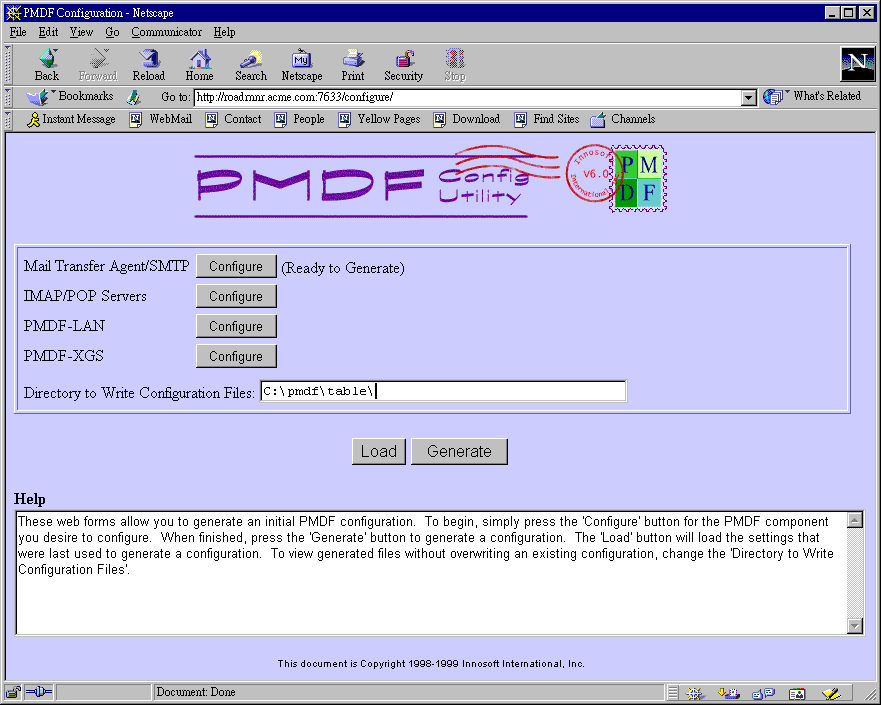
Figure 6-9 shows the configuration utility main menu, after entering
configuration information for the MTA/SMTP component. At this point you
may either generate just the main MTA configuration files by clicking
the "Generate" button, or you may select another component to
also configure at this time. For instance, clicking the IMAP/POP
Servers "Configure" button will continue the configuration,
as shown in Figure 6-10 through Figure 6-16 following.
Figure 6-9 Configuration main page, MTA configuration
entered
Previous
| Next
| Contents