Figure 26-1 Sample PMDF-XGS site ACME.COM
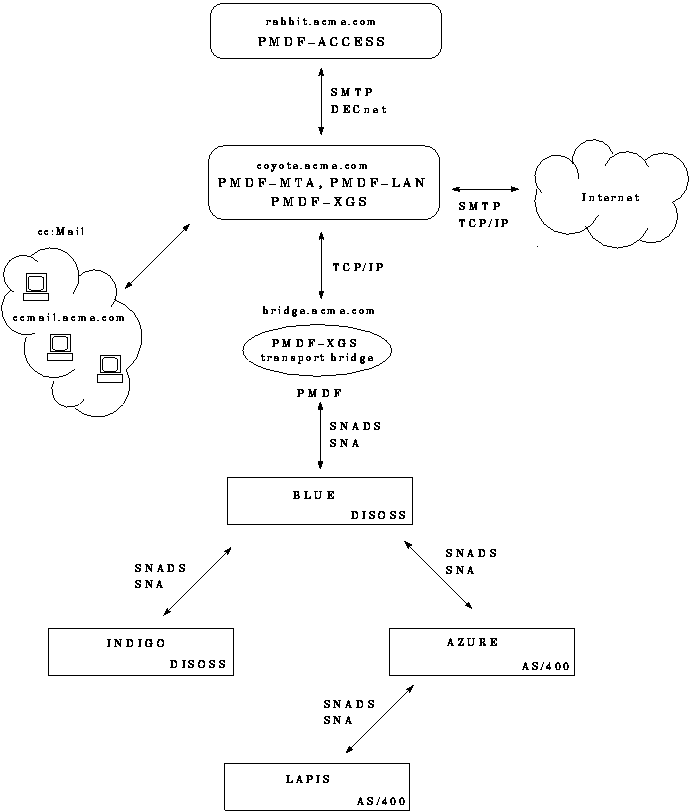
Figure 26-2 through Figure 26-4 show an example of configuring a PMDF-XGS gateway at ACME.COM on node COYOTE, and Example 26-1 shows a corresponding checklist file. The sample site ACME.COM, shown in Figure 26-1 , has a PMDF mailhub system, COYOTE, as well as an additional non-clustered PMDF-ACCESS system RABBIT, and has PC-LAN based cc:Mail users connected through PMDF-LAN and considered to be in the domain ccmail.acme.com.
ACME.COM also has connections to the Internet over TCP/IP. ACME.COM also has four SNADS nodes, BLUE, INDIGO, AZURE, and LAPIS, and an OS/2 system, with TCP/IP name bridge.acme.com and SNADS name PMDF, that will act as the transport bridge between the SNADS side and the PMDF side. PMDF-MTA, PMDF-LAN, and PMDF-XGS have been installed on COYOTE, and PMDF-MTA and PMDF-LAN have already been configured on COYOTE. The SNADS nodes have been configured to know about the PMDF-XGS transport bridge and the COYOTE system. The PMDF-XGS transport bridge component has been installed and configured on the transport bridge system, and is using the default TCP/IP ports for communicating with the PMDF system COYOTE.
Remember that the values entered in this sample are for purposes of example only. Be sure to use the values appropriate for your system when you perform the actual configuration.