The choice of character set is specified with the USERNAME_CHARSET option as described in Chapter 3 .
1.3.2 Account passwords
Passwords are used to authenticate a would-be user of the popstore.
That is, a user wishing to access the popstore must supply a valid
popstore account username as well as the password for that account. The
user-supplied password is checked against the password stored for the
account: only if they match is access permitted.
1.3.2.1 Password location
Each popstore account requires a password. A password can either be
stored with the popstore account's profile or it can be stored
externally outside of the popstore. Regardless of where the password is
stored, it may be set and changed with the popstore management and user
interfaces as well as with the PMDF poppassd server. PMDF's
authentication API is used by the popstore both to authenticate as well
as set or change passwords. By default, this means that when a password
is authenticated, it will be checked against
- the user's popstore profile provided that the PWD_ELSEWHERE usage flag is not set for that profile;
- or the PMDF password database if an entry exists for the user;
- or the operating system's password database if an entry exists for
the user.
The first password entry found for the user is that used to compare
against the supplied password. If the password supplied by the user
matches the password in the entry found, then access is permitted. If
the supplied password does not match, access is denied. Further
password entries are not checked.
When a password is set or changed for a popstore user, it will by default be
- added or changed in the user's popstore profile provided that the PWD_ELSEWHERE usage flag is not set for that profile;
- and changed in the PMDF password database provided that a previous entry for the user already exists;
- and changed in the operating system's password database provided
that an entry for the user already exists.
The above actions are the default behavior---the behavior when PMDF's authentication facilities are using their default configuration. Those facilities may be reconfigured to act differently and even to use other repositories of password information (e.g., an LDAP server or other authentication server). For more information on PMDF's authentication facilities, see the "Connection Authentication and Password Management" chapter of the PMDF System Manager's Guide. When using those facilities, the popstore uses a service name of
POP. When a password is stored with the account's profile, the plain text form of the password is encrypted and stored. Such passwords are- case sensitive,
- may contain any bytes (0x00---0xff), and
- may be up to 32 bytes long.
To store a password in an external source, mark the account with the PWD_ELSEWHERE usage flag. This tells the popstore that the password is stored externally. See also the information on password migration in the PMDF System Manager's Guide.
The POP3 server uses PMDF's authentication services and as such supports plain text as well as APOP, CRAM-MD5, and DIGEST-MD5 password authentication. Moreover, the POP3 server supports SASL (RFC 2222).
POP users may change their account passwords with PMDF's poppassd server, as described in Section 11.3 , or with the web-based user interfaces described in Chapter 5 . The poppassd server implements an ad hoc password changing protocol employed by several popular POP3 clients such as Eudora.
1.3.2.2 Using the operating system's password database
With the default configuration of PMDF's authentication services, using the operating system's password database is quite straightforward. Simply set the PWD_ELSEWHERE usage flag for each popstore account which is to use the operating system password database.4 Once this has been done, authentication will be performed against- the PMDF password database if an entry exists for the user;
- or the operating system's password database if an entry exists for
the user.
Since, by default, users do not have entries in the PMDF password
database, authentication will be performed against the operating
system's password database (e.g.,
/etc/passwdon UNIX systems andsysuaf.daton OpenVMS systems). Note, however, that this requires that there be an entry for the user in the operating system's password database. Usually, this means that the user will also have a login account on the system.1.3.3 Account quotas
Account quotas may be used to control how much message storage a given account may have. When an account exceeds its storage quota, as measured in bytes of disk storage, the account may not receive new mail messages. The user must delete some of their stored messages in order to receive new mail messages.Each account has two storage quotas: a primary storage quota and an overdraft quota. This two-quota scheme is used for efficiency purposes. With most message transfer protocols, the size of an incoming message is not known upfront and a message has to be received in its entirety in order to determine its size. Use of an overdraft quota allows PMDF to temporarily refuse to accept incoming messages for an over quota user. How so? If a user has just one quota limit, then odds are they will never quite attain it. For instance, if they have 100 spare bytes of storage they are not over quota and so the SMTP server will accept new messages for the user. However, most received messages will be larger than 100 bytes and will thus need to be bounced. This will continue until the user receives enough small messages to exactly use up those remaining 100 bytes. Once they have exactly consumed their quota, the SMTP server can now immediately refuse further messages without the need to first receive the message and see how large it is. But this is only possible once the user has exactly consumed their quota. An alternative is to have a "fudge" factor of some form. Once the user is somehow close to their quota, the server refuses additional messages. The popstore's overdraft quota is such a fudge factor. A user's quota is really a quota range with a lower limit given by their message storage quota and the upper limit given by the sum of their message storage quota and their overdraft quota.
All that having been said, note that by default PMDF will not reject incoming messages for an over quota user. By default, PMDF accepts the messages and holds onto them until either the user has available quota to receive the messages or the messages "times out" and are returned by PMDF's message bouncer. To have PMDF reject incoming messages for an over quota user, specify REJECT_OVER_QUOTA=1 in the popstore option file as described in Section 3.4 . When REJECT_OVER_QUOTA=1 is specified and a user is over quota, the message copy for the over quota user will be rejected with a temporary error message.
If desired, accounts may be granted unlimited storage quota as denoted by a primary quota value of zero.
1.3.4 Management groups
For management and accounting purposes, you may associate with each popstore account a group name. Use of group names is optional. You may ignore this feature for the time being and later, if a need should arise, then begin using it.Group names are case-insensitive and may be zero to sixteen bytes long. Group names are shared across all user domains. When you create a new account and do not specify a group name for the account, the account is placed in the same group as the
defaultaccount. By default, thedefaultaccount is not in any group --- it has a group name of zero length. This group with a zero length name is referred to as theworldgroup.There are two primary uses for management groups:
- Accounting: For instance, listing or billing all accounts within the same management group.
- Management: Allowing a privileged account to only manage a subset
of the popstore accounts.
In regards to the latter usage, a privileged popstore account --- that
is a popstore account with the MANAGE flag set --- may perform
management functions on only those accounts within the same user domain
and management group. A privileged popstore account which is in no
group (and hence is in the
worldgroup) may manage all popstore accounts within the same user domain. However, a privileged popstore account which is in no group and is in thedefaultuser domain may manage all accounts within all user domains and groups.The actual details behind defining groups and assigning group names to accounts is documented in Chapters 4 --- 7 as part of the discussions of the various account management commands. Note that only two classes of users may create, delete, or modify group definitions. These classes are (1) users with operating system privileges, and (2) popstore users with privileged account which themselves are in no group [and thus are in the
worldgroup]. The first class may use the interactive command line management utilities; the second class may use either the interactive command line or web-based management utilities.Groups may be nested. That is, a group may contain subgroups and those subgroups may contain further subgroups. An account is contained in the group
Gif either (1) the account's group name isG, or (2) the account's group is a subgroup (nested arbitrarily deep) of the groupG. Theworldgroup --- the group with zero length group name --- is a distinguished group: it implicitly contains all other groups.You can visualize typical group hierarchies as an inverted tree. A hypothetical example with nine groups is shown in Figure 1-1 . The root of the tree is the
worldgroup, which contains all other groups. Thestaffandfacultygroups have no subgroups. Thestudentsgroup, however, has five subgroups.Group hierarchical structure need not be a tree: in the language of graph theory, loops are allowed. For instance, a group may be a subgroup of more than one group. Modifying the example of Figure 1-1 , it is possible for
gradto also be a subgroup ofstaff.Figure 1-1 Example management groups
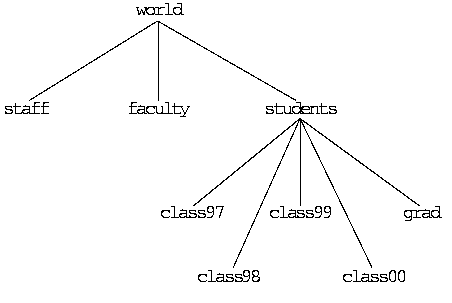
The ability to nest groups is particularly useful in regards to account management. An account with management privileges may manage any account within the same group as the privileged account itself. Thus, if a privileged account has a zero length group name, then that account may manage any and all accounts. If, however, the privileged account is in a group with a non-zero length group name, then that privileged account may only manage accounts contained within the same group. For instance, a privileged account in the
studentsgroup can manage any account in that group; i.e., any account with group namestudents,class97,class98,class99,class00, orgrad. A privileged account in the groupclass97can only manage other accounts in the groupclass97. If you wish to have an account which can manage bothstaffandfacultybut notstudents, then just create a new group named, for instance,deanand makestaffandfacultybe subgroups of that new group. Then, make the group name for the privileged account bedean.If you wish to allow an account to manage all accounts yet be in a named group such as
manager, then create a group namedmanagerand make theworldgroup be a subgroup of themanagergroup.1.3.5 User domains
By default, all popstore accounts are considered to be part of the same user domain called thedefaultdomain. This is true regardless of the e-mail address used to reach the account's mailbox. At some sites, however, it is useful to have distinct sets of user communities, each differentiated by a distinct Internet host name. For instance, one community may be the acme.com community with mail addressed to user@acme.com while another community may be the frob.org community with mail addressed to user@frob.org. In the popstore,5 each community may be assigned a different Internet host name with an associated community name called a "user domain name".The popstore user
userin the user domainhosthas the e-mail addressuser@host.6 The delivery channel, which may deliver mail for several different user domains, determines which domain or domains a message should be delivered to by examining each envelope recipient address. The non-legacy POP server determines which user domain a client is in from either the username presented by the client or from the PORT_ACCESS mapping table. In regards to the former, the client must present a username of the formuser%hostoruser@host.7 In regards to the latter, consult the PORT_ACCESS mapping table documentation in the PMDF System Manager's Guide. Use of that table allows selection of the user domain to be based upon such information as the client's source IP address or the TCP port which the client has been configured to use for POP service.When managing the popstore via the Web-based management utility, the user domain to manage is specified by including it in the URL; for example, to manage the
frob.orguser domain, use the URLhttp://host:7633/popstore/frob.org/admin.html
When using user domains, there will be a special user domain referred to as the
defaultdomain. The official host name for the delivery channel will be mapped to thedefaultdomain. Moreover, a privileged management account in thedefaultdomain which is in no group may manage any account within the popstore regardless of user domain. To make this a little more clear, consider the channel definitionpopstore defragment holdexquota acme.com frob.org
In the above, the host acme.com is the channel's official host name and therefore identified with the popstore'sdefaultuser domain; the host frob.org is identified with thefrob.orguser domain.8 Mail to sue@acme.com is delivered to the accountsuein theacme.comuser domain. Mail to sue@frob.org is delivered to the separate accountsuein the user domainfrob.org. Accounts associated with the acme.com host are managed by managing thedefaultuser domain; accounts for the frob.org host are managed via thefrob.orguser domain.See Sections 6.13 and 7.13 for detailed information on creating a user domain and managing accounts within it.
1.3.6 Account usage flags
Through "usage flags", account access to the popstore may be controlled:DISMAIL
The DISMAIL flag is used to prevent an account from receiving new mail messages. When this flag is set for an account, new messages are rejected and returned to their sender. The account owner can, however, read any existing messages they might have unless the account is also flagged with the DISUSER flag.DISUSER
The DISUSER flag is used to deny access to an account. The account can, however, continue to receive new messages unless it is either over quota or also flagged with the DISMAIL flag. When the user attempts to access their account, they will be met with an "account disabled" error message.LOCKPWD
The LOCKPWD flag prevents users from changing their account's password. The password may only be changed by a user with the management privilege or operating system privileges.MANAGE
Accounts with this flag may use the web-based interface to manage the popstore. In addition, users with unprivileged login accounts to the platform running the popstore may manage the popstore using the command line interface when their popstore account has the MANAGE flag set. This is accomplished through the command line interface's LOGIN command. Section 1.3.7 for further details.MIGRATED
This is a flag used by the PMDF's migration utilities to track whether or not migration from an external source to the popstore has been completed for a given popstore user account.PWD_ELSEWHERE
This flag tells the popstore that the user's password information is stored externally, outside of the popstore. The popstore's authentication mechanisms use this flag when determining how to authenticate a user password. See Section 1.3.2 for further details.With the exception of the MANAGE and NOMANAGE flags, these flags may be set or cleared with either the web-based or command line management interfaces. As a security precaution, the MANAGE and NOMANAGE flags may only be manipulated through the command line interface.
Note that PMDF itself has a variety of other access control mechanisms such as the SEND_ACCESS mapping table to control access at the envelope address level and the PORT_ACCESS mapping tables to control access at an IP level. See the PMDF System Manager's Guide for details on these and other access mapping mechanisms provided by PMDF.
1.3.7 Privileged accounts
The popstore has the concept of "privileged" popstore accounts. These are popstore accounts which have the MANAGE usage flag set. Only accounts with the MANAGE flag set may use the web-based management interface. As a security precaution, this flag may not be set or cleared through the web-based interface. That means that the command line interface must be used to grant an account management privileges. That, in turn, requires a priviliged login account to the operating system running the popstore. From that login account, one or more popstore accounts may be granted management privileges. Those accounts may then be used to manage the popstore either through the web interface or, as described in Sections 6.14 and 7.14 , the command line utility.Privileged accounts may only manage other accounts within the same management group and user domain. If a privileged account is in the
worldgroup (i.e., is not in any group or is in a group which explicitly contains as a subgroup theworldgroup), then it may manage any popstore account within the same user domain. However, a privileged popstore account which is in theworldgroup and is in thedefaultuser domain may manage all accounts within all user domains and groups.1.3.8 Bulk loading
Accounts may be created en masse using the command line management utility. This is done by creating a file of commands, one command per line, and then directing the utility to process the commands from that file. For further details, see Sections 6.7 (UNIX and NT) or 7.7 (OpenVMS).1.3.9 Account storage
The information associated with each user account is stored in a "profile" file on disk. One file per user account is used. An account's settings, usage information, and list of currently stored messages is stored in its profile file. On UNIX systems, the location of these files are determined via the PMDF_POPSTORE_PROFILES option in the PMDF tailor file; on NT systems, the PMDF_POPSTORE_PROFILES registry entry is used, and on OpenVMS systems, in thePMDF_POPSTORE_PROFILES:directory tree.Read and write access to these files is controlled using private locks. As such, they should only be accessed using the popstore API routines documented in Chapter 12 .
Each profile file has a base size of 256 bytes plus 40 bytes per message stored for the user. Presently, the profile files are interchangeable amongst the different platforms on which the popstore runs. That is, for instance, it is presently possible to move the popstore from one platform to another without the need to reformat the profile files.9 See Section 8.1 for complete details on migrating the popstore to another platform.
Note:
The profile files must be stored on a disk with a reliable file system. The profile files must not be accessed via NFS: NFS, even with a lockd daemon, does not provide adequate file locking, integrity, or performance and is not supported.
Note
² A leading underscore character in a recipient address is interpreted by the delivery agent as a request to ignore any forwarding for that recipient. For instance, a message for _jdoe@pop.acme.com is delivered to the popstore account
jdoeregardless of any popstore forwarding which might exist for that account. A plus sign and any characters to the right of it but before the at sign, "@", are also ignored. For instance, mail to the address joe+hbd-list@acme.com would be delivered to the popstore accountjoe.³ For storage purposes, account names are stored in lowercase.
4 You may also want to effect that setting for the
defaultaccount so that new accounts automatically have that setting.5 This functionality is not yet supported by the PMDF MessageStore.
6 Accounts in the
defaultuser domain would use the delivery channel's official host name rather than @default.7 Note that not all clients can handle a username of
user@host: attempts to configure such a username are sometimes interpreted by the client as meaning, "The username isuserand the POP server ishost". For this reason, users may achieve better results by configuring their clients withuser%hostas their username.8 Note that if the USE_DOMAINS option is set to its default value of zero in the popstore option file, then all domains associated with the popstore channel will be identified with the popstore's
defaultuser domain.9 While Innosoft hopes to maintain this level of portability in the future, it may not be possible, at which point a conversion utility will be provided.
1.4 Messages
When PMDF receives a message for the popstore, the message is queued to the popstore's inbound delivery channel. That channel then processes each queued message and stores the resulting messages in the popstore's message store. A single message copy is stored for all recipients of a message. Once a message has been deleted by each recipient, it is deleted from the store itself.
Message storage quotas are set on a per-user basis via the quota and overdraft quota account settings. See Section 1.3.3 for further details.
Users access their stored mail messages via their POP3 client and the popstore's POP3 server. Ideally, users download their messages and delete them from the store itself. By default, if a message is not deleted within a fixed number of days, the message will be deleted silently. Should one or more of the recipients not have read the message, a non-delivery notification is sent to the message's originator prior to deleting it.
Popstore administrators can delete message files using either of the two management utilities. Optionally, when a message file is deleted, a non-delivery notification can be sent to the originator of the message. The non-delivery notification will state which recipients had not read the message.
The actual message files are binary files stored in a ready-to-download format. On UNIX systems, these files are kept in the directory tree specified by the PMDF_POPSTORE_MESSAGES option in the PMDF tailor file; on NT systems, the PMDF_POPSTORE_MESSAGES registry entry is used; and, on OpenVMS systems, in the
PMDF_POPSTORE_MESSAGES:directory tree. Read and write access to these files is controlled using private locks. The files should only be accessed using the popstore API routines as documented in Chapter 12 .The size of each message file varies depending upon the amount of envelope information and message content which must be stored. Presently, the message files are interchangeable amongst the different platforms on which the popstore runs. That is, for instance, it is presently possible to move the popstore from one platform to another without the need to reformat the message files. While Innosoft hopes to maintain this level of portability in the future, it may not be possible, at which point a conversion utility will be provided.
Note:
The message files must be stored on a disk with a file system which supports byte range file locking. The message files must not be accessed via NFS: NFS, even with a lockd daemon, does not provide adequate file locking, integrity, or performance and is not supported.
1.5 Forwarding mail
The popstore includes a forwarding database which can be used to re-route mail for the popstore to other addresses. The addresses may be either internal or external to the popstore. Moreover, forwardings need not correspond to actual popstore accounts. For instance, if mail for staff@pop.acme.com is to be forwarded to a PMDF mailing list, then there need not be astaffaccount in the popstore. Note that when a forwarding is established for a popstore account, the popstore account itself will not receive copies of its forwarded messages.Forwardings are recursive. That is, if a popstore address has a forwarding which in turn points to another popstore address, then that new address will also be checked for a forwarding. In addition, a forwarding may point to more than one address. That is, a forwarding may forward to multiple addresses and, moreover, some of those addresses may themselves be forwarded.
Forwardings are established, examined, and removed through either of the management interfaces. The forwardings are stored in an ordinary PMDF CRDB database --- the PMDF_POPSTORE_FORWARD_DATABASE. If desired, the database can be manipulated using ordinary PMDF tools as well as through the PMDF API.
Messages destined to the popstore may explicitly defeat any forwarding by prefixing the address with an underscore character, "_". For instance, if the account "
jdoe" has mail forwarded elsewhere, then a message sent to the address _jdoe@pop.acme.com will bypass that forwarding and be delivered to the "jdoe" account. To explicitly forbid such bypassing, the DISMAIL usage flag may be set for the account in which case mail to _jdoe@pop.acme.com will be returned as undeliverable.Finally, note that it is the popstore delivery channel which actually effects mail forwardings. When processing message files, it checks each recipient to see if a forwarding exists. If it does, it then uses the forwarding address instead. If the forwarding address points back to the popstore, it then checks that address for a forwarding. This process is iterated up to ten times; an address which is forwarded internally more than ten times is deemed to be a forwarding loop and is rejected. If the forwarding address is external to the popstore, then a new message is enqueued with the forwarding address used as its envelope To: address.
Previous | Next | Contents